Thursday, April 22, 2010

SQL User Meeting on 29th April 2010

Singapore SQL Server User Group


April User Group Meeting

Topic: Analysis Services 2008: Real time cube and Proactive caching

Synopsis:

SSAS is able to answer to real time BI scenario thanks to pro-active caching. During this presentation, we will see how ESSILOR uses this technology in order automate BI for plants, analysis and financial BI, keeping a detailed view and aggregated view at the same time (Asymmetric Pattern).

Speaker: Renaud Harduin
MVP – SQL Server

Renaud Harduin was Business Intelligence Domain Manager for ESSILOR (www.essilor.com) where he is in charge of reporting projects for Finance, Distribution and Production. Today, he's working on new functional aspects as forecast and operational Scorecard. He is now Technical Manager of Order Management Information System for ESSILOR, and kept a BI expertise for European projects.

Blog : http://www.dotnetguru2.org/renaudharduin/

Date: April 29th, 2010
Time: 7:00PM – 8:30 PM
Registration starts at 6:30 PM
Venue: Auditorium 21st Floor, Microsoft Office One Marina Boulevard

Please confirm your attendance by sending email to sqlugsingapore@mvps.org


Community Technology Update (CTU)

The first edition for CTU 2010 will be held on May 2010. Please mark your calendar and make a date with us! We will send you the detail soon. The theme of coming CTU is SQL Server 2008 R2 community launch. We will have special guest coming down to share the latest release of SQL Server.

Join for the Virtual Launch Event – May 12th

Office 2010 and SharePoint 2010 will be official launched to business customers on May 12 in New York City with a keynote from Stephen Elop, President of Microsoft’s Business Division. People around the globe can participate in a virtual launch by going to http://www.the2010event.com/. The virtual launch will include product demos, customer and partner testimonials, and interviews with product managers and executives.

Hope to see you all there.

Monday, April 19, 2010

SQL Server 2008 R2 ebook

Guys,

As we all are aware that SQL Server 2008 R2 will be released in May. recently a book is released on SQL Server 2008 R2 Microsoft SQL Server 2008 R2, by Ross Mistry and Stacia Misner

The book is divided into 10 chapters and has total 216 pages:


PART I Database Administration

CHAPTER 1 SQL Server 2008 R2 Editions and Enhancements
CHAPTER 2 Multi-Server Administration
CHAPTER 3 Data-Tier Applications
CHAPTER 4 High Availability and Virtualization Enhancements
CHAPTER 5 Consolidation and Monitoring


PART II Business Intelligence Development

CHAPTER 6 Scalable Data Warehousing
CHAPTER 7 Master Data Services
CHAPTER 8 Complex Event Processing with StreamInsight
CHAPTER 9 Reporting Services Enhancements
CHAPTER 10 Self-Service Analysis with PowerPivot

How Is This Book Organized?

SQL Server 2008 R2 is a collection of components that can be implemented either separately or as a group to form a scalable data platform. This book is divided into two parts to focus on the new capabilities for each of these areas.

Part I, “Database Administration,” is for the DBA's and introduces numerous innovations in SQL Server 2008 R2.

Chapter 1, “SQL Server 2008 R2 Editions and Enhancements,” discusses the key enhancements, what’s new in the different editions of SQL Server 2008 R2, and the benefits of running SQL Server 2008 R2 on Windows Server 2008 R2.

Chapter 2, “Multi-Server Administration,” readers learn how centralized management capabilities are improved with the introduction of the SQL Server Utility Control Point. Step-by-step instructions show DBAs how to quickly designate a SQL Server instance as a Utility Control Point and enroll instances for centralized multi-server management.

Chapter 3, “Data-Tier Applications,” focuses on how to streamline deployment and manage and upgrade database applications with the new data-tier application feature.

Chapter 4, “High Availability and Virtualization Enhancements,” covers high availability enhancements and includes step-by-step implementations
for ensuring business continuity with SQL Server 2008 R2, Windows Server 2008 R2, and Hyper-V Live Migration.

Chapter 5, “Consolidation and Monitoring,” a discussion on consolidation strategies teaches readers how to improve resource optimization. This chapter also explains how to use the new dashboard and viewpoints to gain insight into application and database utilization, and it also covers how to use capacity policy violations to help identify consolidation opportunities, maximize investments, and ultimately maintain healthier systems.


PART II - “Business Intelligence Development,” readers discover components
new to the SQL Server data platform, as well as significant enhancements to the reporting component.

Chapter 6, “Scalable Data Warehousing,” introduces the data warehouse appliance known as SQL Server 2008 R2 Parallel Data Warehouse by explaining its architecture, reviewing data layout strategies for optimal query performance, and describing the integration points with SQL Server BI components.

Chapter 7, “Master Data Services,” readers learn about master data
management concepts and the new Master Data Services component.

Chapter 8, “Complex Event Processing with StreamInsight,” describes scenarios that benefit from complex event analysis, and it illustrates how to develop applications that use the SQL Server StreamInsight engine for complex event processing.

Chapter 9, “Reporting Services Enhancements,” reviews all the new features available in SQL Server 2008 R2 Reporting Services that support self-service reporting and address common report design problems.

Chapter 10, “Self-Service Analysis with PowerPivot,” continues the theme of self-service by explaining how users can integrate disparate data for analysis by using SQL Server PowerPivot for Excel, and how to centralize and share the results of this analysis by using SQL Server Power-Pivot for SharePoint.

Please download the book here:


XPS format


PDF format


Happy SQL Coding.....

Tuesday, March 30, 2010

Tom Casey on Microsoft’s BI Strategy

Guys,

Let's look at the past, present, and future of BI through a discussion conducted by SQL Server Magazine. They talked with TOM CASEY, Microsoft general manager for SQL Server BI.

Click here to read the complete discussion.

Tom Casey on Microsoft’s BI Strategy

Enjoy

Happy SQL Coding


Monday, March 29, 2010

Authentication Modes in SQL Server

Hi,

Today we will discuss various authentication modes available in SQL Server. A script that helps to check current Authentication Mode and how we can change the Authentication mode from Registry.


There are 3 authentication modes in SQL Server:
  • SQL Server
  • Windows Authentication
  • Mixed Mode

Let's discuss various modes in detail:

SQL Server Authentication allows a user to connect with a specified login name and password. when a request is received SQL Server performs the authentication itself by checking to see if a SQL Server login account has been set up and if the specified password matches. If SQL Server does not have a login account set, authentication fails and the user receives an error message.

The authentication diagram as per BOL is:


Windows Authentication mode allows a user to connect through a Microsoft Windows user account. When a user connects through a Windows user account, SQL Server validates the account name and password by calling back to Windows for the information. SQL Server achieves login security integration with Windows by using the security attributes of a network user to control login access. A user's network security attributes are established at network login time and are validated by a Windows domain controller. When a network user tries to connect, SQL Server uses Windows-based facilities to determine the validated network user name. name and password. Login security integration operates over any supported network protocol in SQL Server.


If a user attempts to connect to an instance of SQL Server providing a blank login name, SQL Server uses Windows Authentication. If a user attempts to connect to an instance of SQL Server configured for Windows Authentication Mode by using a specific login, the login is ignored and Windows Authentication is used.

Windows Authentication has certain benefits over SQL Server Authentication, primarily due to its integration with the Windows security system. Windows security provides more features, such as secure validation and encryption of passwords, auditing, password expiration, minimum password length, and account lockout after multiple invalid login requests.

Because Windows users and groups are maintained only by Windows, SQL Server reads information about a user's membership in groups when the user connects. If changes are made to the accessibility rights of a connected user, the changes become effective the next time the user connects to an instance of SQL Server or logs on to Windows (depending on the type of change). Note that Windows Authentication Mode is not available when an instance of SQL Server is running on Windows.

Mixed Mode (Windows Authentication and SQL Server Authentication)
Mixed Mode allows users to connect to an instance of SQL Server using either Windows Authentication or SQL Server Authentication. Users who connect through a Windows user account can make use of trusted connections in either Windows Authentication Mode or Mixed Mode.

Windows vs SQLServer Authentication
Windows authentication is generally preferred because it provides an optimal level of integration with Windows 2000. User and group accounts from Windows are granted or denied access to SQL Server. Windows 2000 authenticates the user when the user logs on to the network. Because the password is authenticated at network login, SQL Server does not need to know or verify the password of a user.

Windows Authentication provides following advantages over SQL Server Authentication.
  • Windows Authentication can grant group accounts access SQL Server, thus minimizing the over head of login administration
  • Users are authenticated by Windows, resulting in a secure authentication over a network
  • Users could be able to use the same user credentials for network and database access
  • Audited events can be tracked to a network user.

Change Authentication mode through Registry:

We can change the authentication mode from Windows Registry of the machine where SQL Server is installed using following steps:

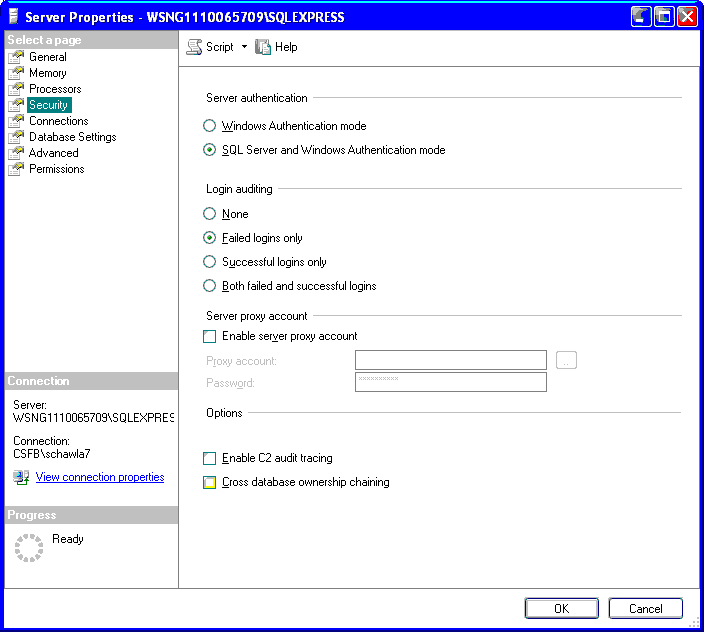
Step 1: Let's check what is the current Authentication mode of our SQL Server:


Step 2: Click Start=>Run and type REGEDIT to open Registry Editor

Step 3: Go to HKEY_LOCAL_MACHINE\SOFTWARE\Microsoft\Microsoft SQL Server\MSSQL.1\MSSQLServer. There you should be able to see LOGINMODE property.


Step 4: Double Click on LoginMode property, it will be either 1 or 2, change it.


Step 5: let's check what's the new/updated Authentication mode. Its already updated to SQL Server & Windows Authentication but it will not work till we restart the SQL Server Service.


Step 6: Restart SQL Server Service


Script to check Authentication Mode:

--SQL 2005 Version

set nocount on
go
DECLARE @SqlPath Nvarchar(255)
DECLARE @instance_name Nvarchar(30)
DECLARE @reg_key Nvarchar(500) 
Declare @value_name Nvarchar(20)
Declare @LoginMode_Value int
Declare @LoginMode Nvarchar(15)

if left(CAST(SERVERPROPERTY('ProductVersion')AS sysname),1) = '9'
BEGIN
select @instance_name = CAST(SERVERPROPERTY('instancename')AS sysname)

if @instance_name is NULL
BEGIN
set @reg_key = 'SOFTWARE\Microsoft\MSSQLServer\MSSQlServer\SuperSocketNetLib\Tcp' 
END
ELSE BEGIN
set @reg_key = 'SOFTWARE\Microsoft\Microsoft SQL Server\Instance Names\SQL'
END

EXEC master..xp_regread @rootkey='HKEY_LOCAL_MACHINE', 
@key=@reg_key, @value_name=@instance_name,
@value=@SqlPath output

if @instance_name is NULL
BEGIN
set @reg_key = 'SOFTWARE\Microsoft\Microsoft SQL Server\MSSQL.1\MSSQLServer\' 
END
ELSE BEGIN
set @reg_key = 'SOFTWARE\Microsoft\Microsoft SQL Server\' + @sqlpath + '\MSSQLServer\'
END 

EXEC master..xp_regread @rootkey='HKEY_LOCAL_MACHINE', 
@key=@reg_key, @value_name='LoginMode',
@value=@LoginMode_Value output

if @LoginMode_Value = 1
set @LoginMode = 'Windows'
if @LoginMode_Value = 2
set @LoginMode = 'Mixed' 

select CAST(SERVERPROPERTY('ServerName')AS sysname) as ServerName, @LoginMode as AuthenticationMode

END

if left(CAST(SERVERPROPERTY('ProductVersion')AS sysname),1) = '8'
BEGIN
select @instance_name = CAST(SERVERPROPERTY('instancename')AS sysname)

if @instance_name is NULL
BEGIN
set @reg_key = 'Software\Microsoft\MSSQLServer\MSSQLServer' 
END
ELSE BEGIN
set @reg_key = 'SOFTWARE\Microsoft\Microsoft SQL Server\' + @instance_name + '\MSSQLServer'
END

EXEC master..xp_regread @rootkey='HKEY_LOCAL_MACHINE', 
@key=@reg_key, @value_name=LoginMode,
@value=@LoginMode_Value output 


if @LoginMode_Value = 1
set @LoginMode = 'Windows'
if @LoginMode_Value = 2
set @LoginMode = 'Mixed' 

select CAST(SERVERPROPERTY('ServerName')AS sysname) as ServerName, @LoginMode as AuthenticationMode
END


Do let me know if you have any comments.

Regards,

HAPPY SQL CODING

Monday, March 22, 2010

Script to Rebuild Index on all Tables

Hi,

Today let's discuss how we can rebuild all indexes on a database.

Here is the script that will generate Rebuild Index statement for all tables & execute it.


DECLARE @Database VARCHAR(255)   
DECLARE @Table VARCHAR(255)  
DECLARE @cmd NVARCHAR(500)  
DECLARE @fillfactor INT 
DECLARE @minId INT
DECLARE @maxId INT

SET @fillfactor = 90 

CREATE TABLE #tmp
(ID INT NOT NULL IDENTITY, Tabname VARCHAR(1000))


INSERT INTO #tmp(Tabname)
SELECT table_catalog + '.' + table_schema + '.[' + table_name + ']' as tableName FROM  INFORMATION_SCHEMA.TABLES WHERE table_type = 'BASE TABLE'

SET @minId=1
SELECT @maxId=COUNT(1) FROM #tmp

WHILE @minId <= @maxId
BEGIN

SELECT @Table=tabname FROM #tmp WHERE id = @minId


SET @cmd = 'ALTER INDEX ALL ON ' + @Table + ' REBUILD WITH (FILLFACTOR = ' + CONVERT(VARCHAR(3),@fillfactor) + ')'  

PRINT @cmd
EXEC (@cmd)  

SET @minId = @minId + 1
END  


DROP TABLE #tmp


Let me know if you have any issue while executing the script.

Regards,

Happy SQL Coding